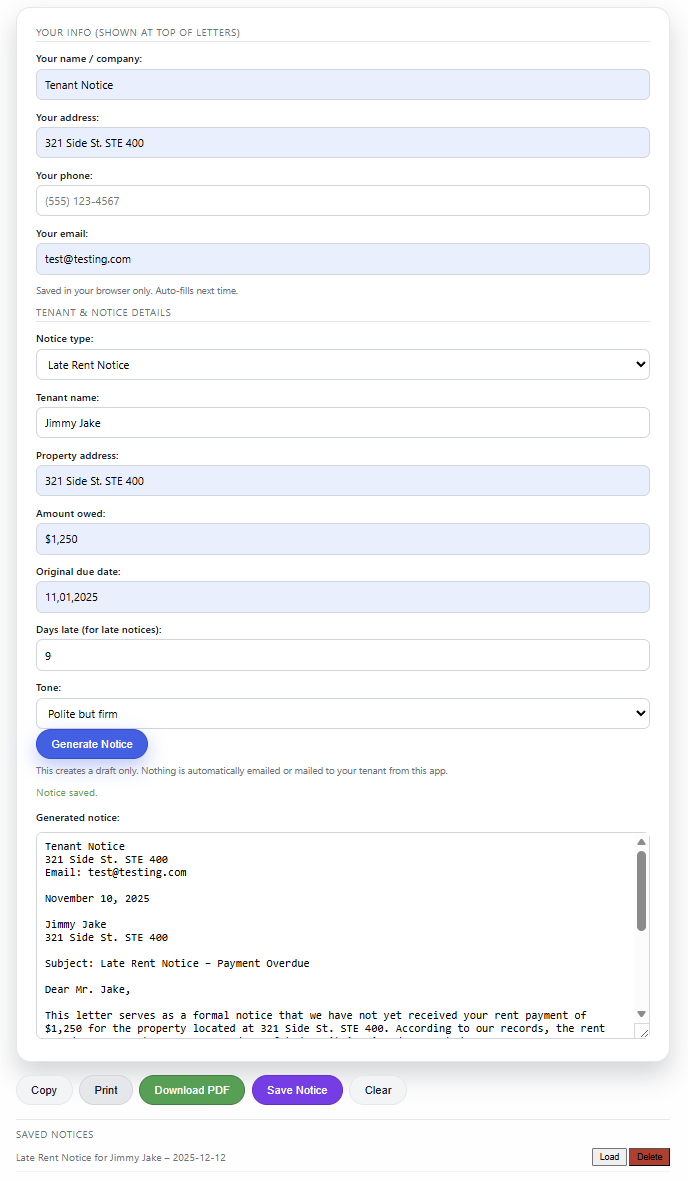
Enter a few details, click one button, and get a ready-to-edit late rent, renewal,
increase, vacate, or entry notice in under 30 seconds — same format every time, no blank Word docs,
no hunting for old emails.
Late rent notices with clear dates, amounts, and next steps
Lease renewal and end-of-lease notices in standard letter format
Rent increase letters with effective dates and new rent amounts
Entry notices for inspections, repairs, and showings
Free: up to 3 notices/day. Pro: $19/month for higher volume.
Used by self-managing landlords & small PMs (1–50 units). Drafts only — nothing is ever sent to tenants automatically.
Why landlords keep Tenant Notice open in a tab:
They can go from “I need to send a notice” to a usable draft in under a minute.
Notices look consistent and professional across every tenant and property.
They manage multiple units and want a simple, repeatable process instead of starting from scratch.
Save time
Generate a clean draft in under 30 seconds.
Look professional
Same tone & structure across every notice.
Stay organized
Save drafts to your account and reuse anytime.
How it works
Create a free account — no credit card required.
Enter tenant + property details in the Notices tab.
Click "Generate Notice" to get a ready-to-edit draft in standard letter format.
Free plan available
See exactly how it works
Example: Fill in details, pick a notice type, generate a professional draft.
You stay in complete control — nothing sends automatically
Late Rent Notice (sample)Preview
Dear John Doe,
This is a reminder that your rent payment for 123 Main St, Unit 4B was due on November 1, 2025 and remains unpaid...
This tool generates draft notices only and does not provide legal advice. Always review and adjust for your lease and local laws.
Tenant Notice
One place to generate late rent, renewal, vacate, increase, and entry notices in a consistent format.
Start on the Free plan; upgrade to Pro only when you need higher volume or saved history.
Help / FAQ
Invite-only – enter your access code:
Step 1: Log in or create a free account. Step 2: Go to the Notices tab, fill in your info, and generate your first letter.
Your info (shown at top of letters)
Saved in your browser only. Auto-fills next time.
Tenant & notice details
This creates a draft only. Nothing is automatically emailed or mailed to your tenant from this app.
Unlock the full notice & unlimited drafts
This draft is ready to send. Upgrade to Pro to see the full text, generate as many notices as you need,
and keep everything saved under one account.
Unlimited rental notices across all 5 notice types
Save and reuse past notices for any tenant or property
Same consistent format every time for your records
$19 / month
No contracts. Cancel anytime from your Stripe receipt.
Your notices and tenant details stay private.
Many owners upgrade as soon as they send their first or second notice.
Saved notices
(No saved notices yet.)
Draft only. Not legal advice. Always review and comply with your local laws before sending notices.
Account
Email:
Plan:
Member since:
Billing & Pricing
Current plan:
Free plan
• Up to notices per day
• Access to all 5 notice types
• Great for small landlords or testing the tool
Pro – $19/month
• Much higher daily limits (designed for active managers)
• Saved notice history per account
• Future premium features included as they launch
Upgrades are handled via a secure Stripe checkout. You can manage or cancel your subscription anytime
through the Stripe customer portal link in your receipt or Stripe emails.
Help & FAQ
Tenant Notice is a straightforward notice generator for small landlords and property managers.
It’s built to remove the busywork of formatting and rewriting the same letters over and over.
Below are quick answers to the most common questions.
What does this tool do?
Tenant Notice generates five types of draft notices you can review and edit before sending:
Late Rent Notice
Lease Renewal Notice
Notice to Vacate (end of lease, non-eviction)
Rent Increase Notice
Notice of Entry (to enter the unit)
You fill in your details, click generate, and it creates a draft in standard letter format.
Is this legal advice?
No. This tool generates draft notices only. It does not provide legal advice and does not
reference specific statutes. Always review each notice yourself and, if needed, with your attorney
or property management advisor to make sure it matches your lease and local laws before sending.
Are notices sent to tenants automatically?
No. Nothing is ever sent automatically. Tenant Notice only generates text on the screen.
You decide how to send it (email, mail, portal upload, posting, etc.) after you have reviewed it.
What information is stored?
Your account: your email, hashed password, plan (Free or Pro), and basic usage counts are stored securely in our database.
Your sender details (name, address, phone, email): are saved in your browser only so they auto-fill next time.
Saved notices: if you choose to save a notice, the title and content are stored per account so you can load them later.
We do not send notices to your tenants and we do not sell your data.
How does the Free plan work?
The Free plan lets you generate up to notices per day,
with access to all 5 notice types. It's meant for small landlords, testing the tool, or occasional use.
What do I get with Pro?
Tenant Notice Pro is designed for more active owners and managers. Pro includes:
Much higher daily limits (up to 1000 notices/day)
Saved notice history per account
Future premium features included as they launch
The price is $19/month and upgrades are handled via a secure Stripe checkout.
How do I cancel Pro?
Pro subscriptions are managed through Stripe. You can use the Stripe customer portal link
(from your receipt or Stripe emails) to manage or cancel your subscription at any time. If you cancel,
you keep access through the end of the current billing period.
What happens when I hit my daily limit?
If you reach your daily notice limit for your plan, the app will stop generating new notices for that day
and let you know that your daily limit has been reached. Usage resets automatically on the next day.
Do I need a credit card to try it?
No. You can create a Free account and generate up to notices per day without
entering any payment details. Upgrading to Pro is optional if you need higher volume.